Note
Need help? Please let us know in the UMEP Community.
3.1. Meteorological Data: Download data (ERA5)
Note
(February/2020) This plugin replaces the WATCH download plugin. To make use of this plugin you need to make additional configurations outside QGIS/UMEP (see below).
Note
ERA5 data is adjusted to UTC = 0. This has implications for other tools in UMEP (see respective tool documentation).
- Contributors:
Name
Institution
Ting Sun
Reading
Fredrik Lindberg
Gothenburg
- Introduction:
Basic meteorological variables are required for most applications in the UMEP processor. If observed data are not available for a particular location, hourly data can be retrieved from the global the Coopernicus programme and thier Climate Data Store. This plugin allows climate reanalysis data to be extracted for a specific location and period of interest (1979-2020), and transformed into formatted forcing files suitable for models within UMEP.
Variables available |
Comments |
|---|---|
Wind speed [m s-1] |
10 m instantaneous |
Air temperature [K] |
2 m instantaneous |
Specific humidity [kg kg-1] |
2 m instantaneous |
Pressure [Pa] |
Instantaneous surface pressure |
Incoming shortwave radiation [W m-2] |
Average over previous 1 hour |
Incoming longwave radiation [W m-2] |
Average over previous 1 hour |
Rainfall rate [kg m-2 s-1] |
Average over previous 1 hour |
- Obtaining ERA5 data via UMEP:
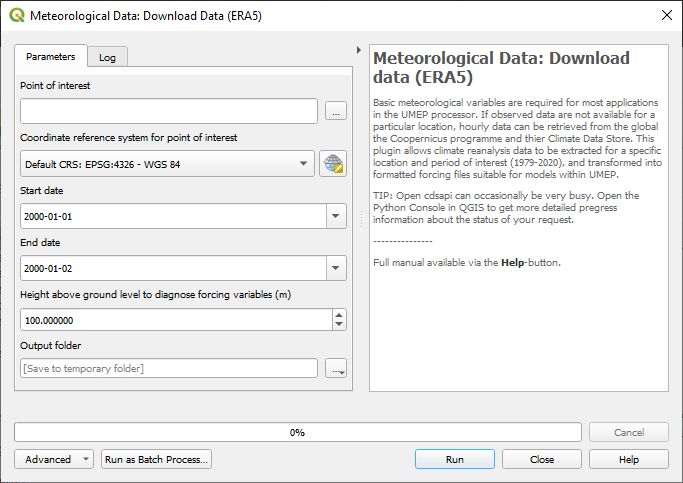
Fig. 3.1 ERA5 data downloader (UMEP for Processing): control panel
- Running the tool:
The downloader is separated into two sections:
Download climate data: Retrieves ERA5 data for all variables for the location and period of interest.
Latitude and longitude: WGS84 co-ordinates of the study location. Data is extracted from the ERA5 grid cell that contains these co-ordinates.
Start time and End Time: The time range of data to be downloaded
- Considerations:
Spatial resolution: The ERA5 data are provided for half-degree grid boxes. In regions with substantial heterogeneity within these grid boxes data at the grid-box scale may be not be representative of your study site (e.g. mountainous regions, urban areas).
Remember to adjust the diagnistic height depending on application. For thermal comfort modelling (SOLWEIG), set a height close to ground level (e.g. 2m) and for urban energy balance modelling (SUEWS), set it to 3 times the height of the roughness elements (e.g. buildings and vegetataion).